Short answer: most App Store rejections come from a few guidelines. Apple says over 40% of unresolved issues relate to guideline 2.1, App Completeness: crashes, placeholder content, broken links and missing demo accounts. The other common ones are vague permission text and privacy issues (5.1.1), screenshots that don’t show the app (2.3), too little functionality (4.2), social login without an equivalent private option (4.8), and digital purchases outside In-App Purchase (3.1.1). Read which guideline the rejection names, fix that exact thing, reply in App Store Connect explaining what changed, and resubmit.
A rejection isn’t a ban. It’s a message saying one specific thing doesn’t meet a specific guideline. Below is each common rejection, what it looks like, and how I fix it in the Flutter apps I ship.
How to read a rejection
In App Store Connect, open your app and go to App Review. The rejected submission shows a message from the reviewer. It always names one or more guidelines, for example “Guideline 2.1 - Performance - App Completeness”, followed by what they saw, often with screenshots and the device they tested on.
Three things to check before you change any code:
- The guideline number. It tells you which rule, and you can read the exact text in Apple’s App Review Guidelines.
- The device and OS. If they tested on an iPad and you only tested on iPhones, that’s often the whole story.
- Whether it’s a rejection or a question. “Guideline 2.1 - Information Needed” isn’t a rejection of the app. They need an answer, and you can usually reply without a new build.
The most common rejections and their fixes
Guideline 2.1: App Completeness (crashes, bugs, placeholders)
What it looks like: “We discovered one or more bugs in your app”, “Your app crashed on launch”, or “We found placeholder content”.
Apple says submissions should be final builds with complete metadata and working URLs, tested on a device, with no placeholder text and with the back end live during review.
How to fix it:
- Test the release build, not debug, on a real device. In Flutter,
flutter build ipaproduces a build with tree shaking and (if you use it) obfuscation, which can fail where debug works. - Test on an iPad too. iPhone apps run on iPad by default, and reviewers often use one.
- Remove “coming soon” screens, empty tabs, test data and lorem ipsum.
- Check every link: the support URL and privacy policy URL in App Store Connect, and every link inside the app.
- If the crash happened on launch, look at the crash log attached to the rejection and at Xcode’s Organizer. A common Flutter cause is a missing
Info.plistkey for a permission a package asks for.
Guideline 2.1: Information Needed (demo account)
What it looks like: “We were unable to sign in” or “Please provide a demo account”.
How to fix it: in App Store Connect, under App Review Information, add a username and password for a working account with realistic sample data. If the app needs special hardware, a QR code or an invite code, explain how to get past it in the notes, or attach a short screen recording. Make sure the server that account uses stays online during review. A staging server switched off over the weekend is a classic cause.
Guideline 5.1.1: Data collection, permission strings and privacy
What it looks like: “Your app’s purpose string does not sufficiently explain the use of protected resources”, or questions about why the app asks for certain data.
Permission text (“purpose strings” in Info.plist) must explain what the feature does with the data. “This app needs access to your camera” doesn’t. “Acme uses your camera to scan QR codes at checkout” does.
How to fix it:
- Rewrite each purpose string to name the feature and the benefit. My free iOS permission text generator writes the
Info.plistlines for Flutter apps and flags vague wording. - Ask for a permission at the moment the user needs it, not on the first launch.
- Don’t ask for data the app doesn’t need. If a package asks for a permission you don’t use, remove the package or the feature.
- Make sure the privacy policy says what you collect, why, who you share it with, and how users delete it. See what Apple and Google require in an app privacy policy, or create one with the app privacy policy generator.
Guideline 5.1.1(v): Account deletion
What it looks like: “Your app supports account creation but does not include an option to initiate account deletion.”
How to fix it: if users can create an account, they must be able to start deleting it inside the app, usually from the settings or profile screen. A link to an email address isn’t enough. If you use Firebase Auth, delete the user and their data on your server or with a Cloud Function, not only on the device, and sign them out afterwards.
Guideline 2.3: Accurate metadata and screenshots
What it looks like: “Your screenshots do not sufficiently reflect your app in use” or “Your app description mentions features that aren’t in the app”.
Screenshots must show the app being used, not only a splash screen, a login page or marketing art. The name, description and screenshots must match what the current version actually does.
How to fix it: take screenshots of real screens with real-looking data. Marketing text on top is fine, but the app itself must be visible. Remove features from the description that aren’t in this build, and don’t mention other platforms such as Android in the iOS listing.
Guideline 4.2: Minimum functionality
What it looks like: “Your app provides a limited user experience as it is not sufficiently different from a mobile browsing experience.”
This usually means a WebView wrapped around a website, or an app with one screen and nothing an app can do better than a web page.
How to fix it: add features that use the phone: offline access, push notifications, the camera, native navigation, saved data. If the app really is a website, publish it as a website. For Flutter apps built around an existing web product, build at least the main flows natively instead of loading web pages.
Guideline 4.3: Spam
What it looks like: “Your app duplicates the content and functionality of other apps.”
It happens when one developer submits many near-identical apps (for example one per city or one per client from the same template), or when an app is very similar to many others on the store.
How to fix it: combine variants into one app with in-app choices, or make each app clearly different. For white-label client apps, each client should publish under their own developer account, not all under yours.
Guideline 4.8: Login services (Sign in with Apple)
What it looks like: “Your app uses a third-party login service but does not offer an equivalent login option.”
If your app’s main account uses Google, Facebook or another third-party login, Apple asks for an option that limits data to name and email and lets users hide their email address. Sign in with Apple meets this.
How to fix it: add Sign in with Apple next to the other buttons. In Flutter, the sign_in_with_apple package (or Firebase Auth’s Apple provider) handles it, and you need to enable the capability in Xcode and in your Apple developer account.
Guideline 3.1.1: In-App Purchase
What it looks like: “Your app unlocks paid digital content or features without using In-App Purchase.”
Digital things used inside the app, such as premium features, subscriptions, coins or courses, generally have to be sold with Apple’s In-App Purchase, not your own payment page, license keys or QR codes. Physical goods and services used outside the app (food delivery, rides, hotel bookings) are different and use normal payment providers. The rules for linking to outside payments have changed in some regions, so read the current version of guideline 3.1 for the storefronts you sell in.
How to fix it: use In-App Purchase for digital goods (in Flutter, in_app_purchase or RevenueCat), include a “Restore purchases” button, and make sure the purchase items are submitted for review with the build.
Upload errors that look like rejections
Some problems stop the build before a human sees it. You get an email from App Store Connect instead of a review message:
- ITMS-90683: Missing purpose string in Info.plist. A package in your app references a permission (camera, photos, location) and there’s no text for it. Add the key with an honest sentence.
- ITMS-91053: Missing API declaration. Your app or an SDK uses a “required reason” API without a privacy manifest declaring why. Update the packages (most popular Flutter plugins now ship a manifest) and add a
PrivacyInfo.xcprivacyfile for your own code if needed. The Apple privacy manifest generator builds that file and lists the reason codes.
How to reply to App Review
Reply in the App Review section of App Store Connect, on the rejected submission. A good reply is short and specific:
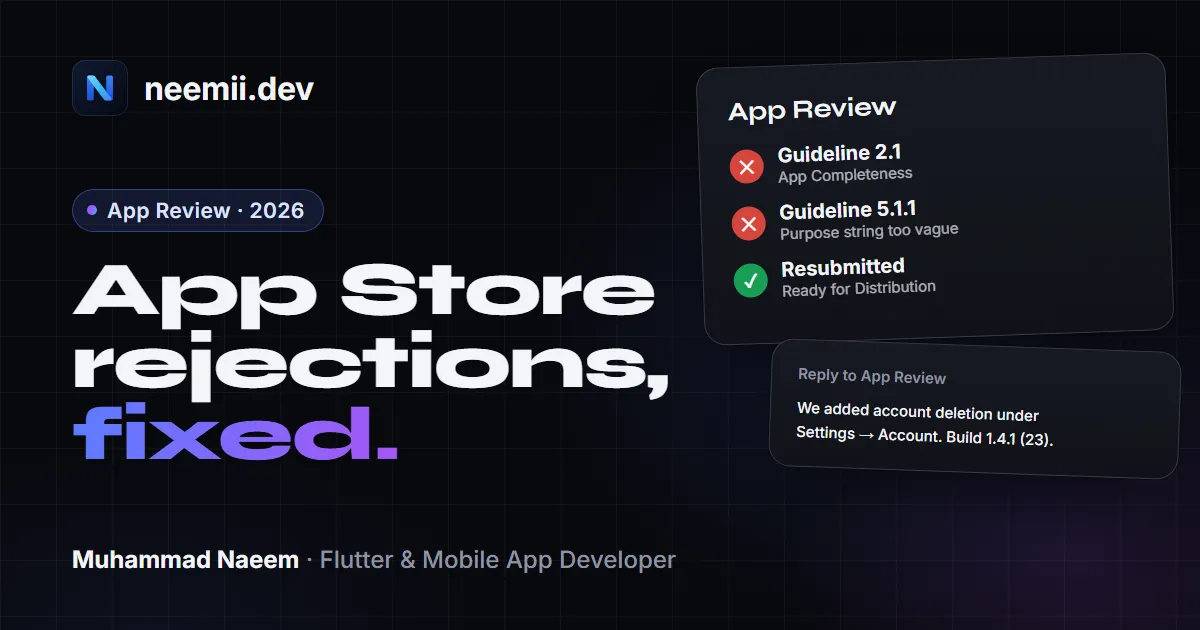
Thank you for the review. We’ve added account deletion under Settings → Account → Delete account (screenshot attached). It removes the account and all user data from our servers. The new build is 1.4.1 (23).
If you think the reviewer misunderstood the app, say so politely and explain what it does. On one of my own apps, a personal budgeting app, App Review treated it as if it handled real money. It only tracks budgets and spending that the user types in, and no money moves through it. A clear reply explaining exactly that solved it without any code change.
A few rules I follow:
- Answer every point in the message, in the same order.
- Attach screenshots or a short screen recording showing the fix.
- Don’t argue about other apps that do the same thing. Reviewers judge your app against the guidelines.
- If you only changed metadata (screenshots, description, demo account), you often don’t need a new build. Update it and reply.
When to appeal
If you’ve replied and still believe the app follows the guidelines, you can appeal to the App Review Board. Give specific reasons with guideline references. Apple accepts one appeal per rejected submission and asks you to answer any open questions from App Review first.
You can also book a 30-minute call with App Review through Apple’s developer site to ask how to fix a rejection, and request an expedited review for a critical bug fix or a time-sensitive event.
How long review takes after a fix
Apple says it typically reviews at least 50% of submissions in under 24 hours and 90% in under 48 hours. A resubmission usually goes through in a similar time. Replies without a new build are often answered faster.
A checklist before you submit
- Release build tested on a real iPhone and an iPad
- Demo account with sample data in App Review Information, and the server online
- No placeholder content, every link working
- Clear purpose string for every permission
- Privacy policy link in App Store Connect and inside the app
- Account deletion inside the app if users can sign up
- Sign in with Apple if you offer Google or Facebook login
- Screenshots of the real app, matching this version
- In-App Purchase for digital goods, with Restore purchases
- Privacy manifest and up-to-date packages
The full release process, including Google Play, is in how to publish a Flutter app on the App Store and Google Play.
Frequently asked questions
What is the most common reason for App Store rejection?
Guideline 2.1, App Completeness. Apple says it accounts for over 40% of unresolved issues: crashes, bugs, placeholder content, broken links and missing demo account details.
Do I need to upload a new build after a rejection?
Only if the fix needs code changes. If the problem was metadata, such as screenshots, the description or the demo account, update it in App Store Connect and reply to App Review without a new build.
How long does Apple take to review a resubmitted app?
Apple typically reviews at least 50% of submissions in under 24 hours and 90% in under 48 hours. Resubmissions usually take about the same time.
Can I appeal an App Store rejection?
Yes. If you believe the app follows the guidelines, appeal to the App Review Board from Apple’s App Review page, with specific reasons. You can submit one appeal per rejected submission.
Why was my app rejected for its permission text?
Guideline 5.1.1 asks apps to explain clearly why they need protected data. Text like “This app needs camera access” doesn’t say why. Name the feature and the benefit, for example “Acme uses your camera to scan QR codes at checkout”.
Does a rejection hurt my developer account?
A normal rejection doesn’t. It’s part of the process, and many apps are rejected once or twice. Repeated attempts to hide features from review, spam or fraud are different and can lead to account termination.
Has App Review rejected your Flutter app? Send me the rejection message. I’m Muhammad Naeem, a Flutter developer with 10+ apps live on the App Store and Google Play, and I can usually tell you what needs to change in one reply. For ongoing releases, see app maintenance and support.
Need a Flutter app built? Tell me about your project, or see case studies of apps I’ve worked on.